ID card software
ID photo software
Сamera control software

  Applications >> inPhoto Capture >> Microscopy
 
Home
News
Products
Download
Buy
Applications
Support
Company
Links
Site map
Contact
 
Microscopy


Application of inPhoto Capture and inPhoto Capture SLR
for microscopy


inPhoto Capture is designed for full control of Canon camera from your personal computer.

inPhoto Capture SLR is designed for full control of Canon SLR (reflex) camera from your personal computer.

Both products work as TWAIN driver or as the stand alone software.

inPhoto Capture and inPhoto Capture SLR can be used for various applications in microscopy and macroscopy:


Camera control application for microscopy
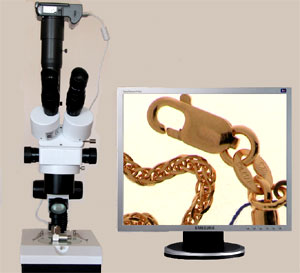
Image capture with Canon camera or Canon SLR camera installed on the stereo microscope. The stereo microscopes are widely used in the semi-conductor industry, for juwellery production, in paleontology and zoology, during forensic studies, and for many other applications.
 
Using Canon camera or Canon SLR camera empowered with the camera control software (inPhoto Capture or inPhoto Capture SLR) you will raise your work to a new level of quality by having full control of your camera settings from your personal computer and full control for the images you have acquired.
  • Refer to description of inPhoto Capture software (Canon camera control) for details on its functionality.

  • Refer to description of inPhoto Capture SLR software (Canon SLR camera control) for details on its functionality.


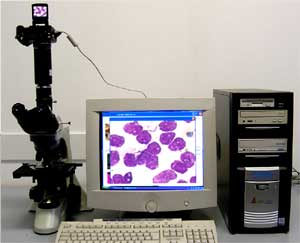
Image capture with Canon camera or Canon SLR camera installed on the compound microscope. No matter whether you use the transmitted or reflected light microscope, the microscope with polarization or luminescence, the images will be captured fast, accurately, and with maximum quality.
 
When you acquire images from a compound microscope it is extremely important to have an ability to adjust focus on smear or tissue images correctly to shoot a sharp image, and with inPhoto Capture or inPhoto Capture SLR software you will have such ability.
 
When you capture fluorescence images you need to be able to control the camera exposure which is especially important for cases of weak luminescence signal, and our camera control software provides this ability as well.
  • Refer to description of inPhoto Capture software (Canon camera control) for details on its functionality.

  • Refer to description of inPhoto Capture SLR software (Canon SLR camera control) for details on its functionality.


Image capture with Canon camera installed on the portable inspection microscopes. These microscopes are used for quick on-site quality control and inspections. The microscopes coupled with the proper adapter can be easily equipped with Canon camera connected with the desktop or laptop computer and controlled with inPhoto Capture software. Such a system is used for documenting the images of tested samples.
  • Refer to description of inPhoto Capture software (Canon camera control) for details on its functionality.


Image capture with Canon camera installed on the macroscopes. These macroscopes are used both for typical microscope laboratory applications and for a variety of non-microscopy related fields of application. They are ideal for use in the field as well as the laboratory.

The macroscopes coupled with the proper adapter can be easily equipped with Canon camera connected with the desktop or laptop computer and controlled by the inPhoto Capture software. Such a system is used for quick and easy photography and documenting the visual state of a sample.
  • Refer to description of inPhoto Capture software (Canon camera control) for details on its functionality.


inPhoto Capture trial version
(Canon camera control)
inPhoto Capture SLR trial version
(Canon SLR camera control)


  See also:
 
Home|News|Products|Download|Buy|Applications|Support|Company|Links|Site map|Contact
 

Contact: +7-812-6006918
Tel/Fax: +7-812-6006918
Tel: +7-921-7578319
email: info@akond.net
Copyright © 2006 - 2010, Akond
Web site designed and developed by Memento Graphics