|
inPhoto Capture SLR software:
stand alone / TWAIN driver for Canon reflex (SLR) camera control
|
|
|
Windows 2000, XP, Vista, Windows 7, Windows 8, Windows 10
Price: 299 USD / 269 EURO.
 Buy Buy  Download Download  Supported cameras Supported cameras
Interested to become a reseller? Questions?
Contact info@akond.net, akondsales@gmail.com
|
 inPhoto Capture SLR
|
inPhoto Capture SLR
brochure (pdf file, 240kb)
|
inPhoto Capture SLR
User Guide (pdf file, 600kb)
|
|
inPhoto Capture SLR is designed for full control of Canon SLR camera from your PC, and automatic ID photo.
inPhoto Capture SLR can work both as stand alone software and as TWAIN driver with all TWAIN compatible ID card applications.
To install and start working with inPhoto Capture SLR is easy and quick:
Install inPhoto Capture SLR camera software,
Connect your Canon SLR camera to computer,
Run inPhoto Capture SLR and start capturing ID photos with your Canon SLR camera controlled from PC.
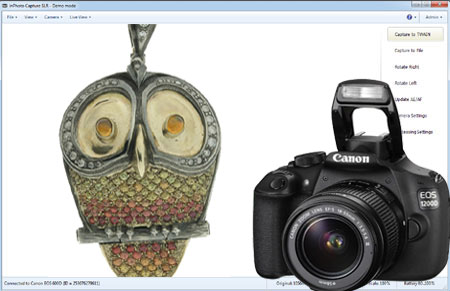
inPhoto Capture SLR program window.
|
inPhoto Capture SLR features:
See also inPhoto ID SLR options.
|
1. Live image preview, Automatic and manual focus, and Image rotation.
Live image preview provides an ability to control the photo quality before capture. All changes made to the Canon SLR camera settings have effect on the previewed photo immediately.
The camera focus is controlled automatically from within inPhoto ID SLR. The focus switch on the camera lense shall be set to A (automatic focus).
Auto and manual focusing. inPhoto Capture SLR provides an ability of automatic or manual focusing on the object. You can focus your camera from the software window, with no need to adjust camera lense by hands.
More about Auto and manual focusing...
Working with inPhoto ID SLR the user can rotate the photo using Rotate right or Rotate left buttons in the right part of the software window. The rotated image will be captured to a TWAIN compatible application: any standard ID card software including Incardex, Asure ID, ID Works, CardFive, EPISuite, ID Flow, and other.
The ability of automatic photo rotation is very useful for ID photo. When the camera is rotated vertically, the previewed image in the live image preview window has album orientation. It is not rotated automatically. Press Rotate right or Rotate left button, and the previewed image will be rotated to the portrait orientation as it is usually required for ID photo.
More about Image rotation...
|
2. Automatic object detection on live image in the preview window.
The object is automatically detected on the live preview image.
When the object is found in the live image displayed in the preview window it is outlined by the yellow frame. The green frame outlines the image area to be cropped.
The yellow frame / green frame areas ratio is set in inPhoto ID SLR options. If the object is located too close to the image frame and the area to be cropped is cut by the image border, the frame color will change from green to red.
|
| 3. Automatic object crop and enhancement. |
|
|
After the image is captured the object area is cropped.
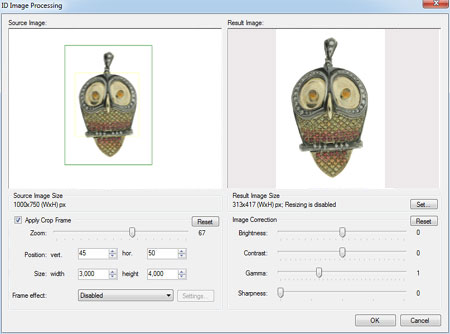
Upon pressing the Capture to TWAIN button in the image preview window the Image Processing window will open. The Image Processing window provides an ability to crop the face area, and enhance the resulting image if necessary.
The object area is automatically outlined by the yellow frame. The green frame outlines the image area to be cropped. The yellow frame / green frame ratio and position are adjusted by Zoom, Vertical Position, and Horizontal Position controls. The Size control is used to set the resulting image size.
If the object is located too close to the image frame and the area to be cropped is cut by the image border, the frame color will change from green to red. In this case the user has three options: ignore, modify the image frame, or press Back button and return back to the image preview window.
The cropped image can be enhanced. It is possible to adjust image brightness, contrast, gamma, and sharpness using the corresponding controls in the right part of the Image Processing window.
It is also possible to resize the resulting image. Press Set button in the upper right part of the Image Processing window and set the resizing options (pixel size of the resulting image).
|
4. Camera settings control from PC.
|
|
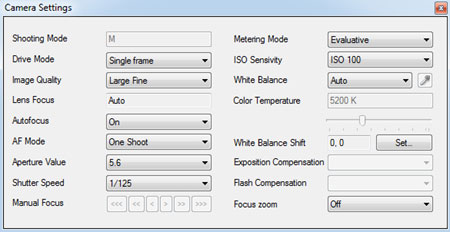
The full control of your Canon SLR digital photo camera settings is performed from your computer.
Press Camera settings button in the right part of the software window to control all available camera settings.
To zoom the image in or out use camera zoom. It is impossible to control Canon SLR camera zoom from PC.
More about Camera settings... |
5. Image export to the TWAIN applications.
inPhoto Capture SLR can be used as ID photo module with all standard ID card software supporting TWAIN.
After the captured photo is automatically cropped in the Image Processing window it is automatically transferred to ID card management software supporting TWAIN (e.g. Incardex from Akond, ID Works and IDCentre from Datacard Group (USA), Asure ID from HID Global (USA), ID Flow from Jolly Technologies (USA), EPI Suite from ImageWare Systems (USA)) and inserted into the photo field. The exported photo is printed on a ready ID card or badge together with other personal information.
More about Image export... |
6. Save ID photo to file.
To capture images and save them to disk press Capture to file button.
The user can set up the folder to save image files. The Save file tab ( Options dialog box) is used to define the save to file settings. It is possible to select the folder to save images to upon pressing Capture to file button and create separate folders for the year / month / day.
Check Ask before saving, and you will be prompted to assign a name to the image file before saving to the specified folder.
|
7. Ability to work as TWAIN driver
If you use TWAIN compatible ID card software (e.g. Incardex, Asure ID, ID Works, EPISuite, ID Flow and others) you you can use inPhoto ID SLR as TWAIN driver and capture ID photos directly to your ID card software.
More about Work as TWAIN... |
8. Ability to work as Stand Alone application
inPhoto Capture SLR can be used as stand alone application. If so the Capture to TWAIN option in the image preview section will be disabled.To capture images and save them to disk press Capture to file button.
Working in stand alone mode you can use all inPhoto Capture SLR functions (live image preview, camera settings control, automatic face detection and crop, image capture and save, etc.) You can set up the folder on your PC to automatically save all captured images.
|
| |