ID card software
ID photo software
Сamera control software

  Applications >> inPhoto Capture >> Light box photography
 
Home
News
Products
Download
Buy
Applications
Support
Company
Links
Site map
Contact
 
Light box photography


Application of inPhoto Capture and inPhoto Capture SLR
for light box photography


inPhoto Capture is designed for full control of Canon camera from your personal computer.

inPhoto Capture SLR is designed for full control of Canon SLR (reflex) camera from your personal computer.

Both products work as TWAIN driver or as the stand alone software.


Light box photography
inPhoto Capture or inPhoto Capture SLR software can be used for photography of the objects placed in the photo light boxes by the product photographers using the photo light boxes to shoot huge numbers of images for the product catalogues and web-presentations.

Equip your light box with with Canon compact camera or Canon SLR (reflex) camera, install inPhoto Capture or inPhoto Capture SLR software which can be used as TWAIN driver to capture images to TWAIN compatible software or as stand alone application to automatically save images to the specified folder on your computer, and get hundreds of images per hour.

The light box will provide the proper lighting for perfect photography, the  Canon camera will provide the high image quality, and inPhoto Capture or inPhoto Capture SLR software will help you to make your job most efficient and comfortable.

  • Refer to description of inPhoto Capture software (Canon camera control) for details on its functionality.

  • Refer to description of inPhoto Capture SLR software (Canon SLR camera control) for details on its functionality.
inPhoto Capture trial version
(Canon camera control)
inPhoto Capture SLR trial version
(Canon SLR camera control)


Light box photography
One of most common and important application of the photo systems based on the light boxes is jewel photography used in the jewellery industry to get jewel photos fast and with the high quality.

On the basis of inPhoto Capture software a separate software product for jewel photography has been developed to photograph the jewels quickly and easily. This is Jewel Photographer software for Canon cameras.

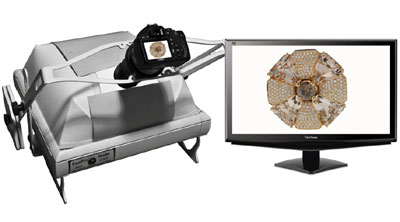
Above software can control Canon camera installed on the Gem Photo Lux light box produced by FourPro company (http://www.fourpro.com). The Jewel Photographer software provides an ability to automatically capture images of different objects (rings, bracelets, necklaces, wathces, etc) with the pre-defined camera settings saved to User Profiles so far making the shooting process fast and easy. Using the Jewel Photographer software as a part of Gem Photo Lux one can produce a finished photo in few seconds with the jewel alone, without any supports or shadows, in a clean white background.


The main advantages of the Gem Photo Lux jewellery photo studio are the following:

the object (juwel, watch, etc.) to be shot is surrounded by the diffused light (even from the bottom) from the pyramid illuminator. The images captured are shadows and reflections free, with perfect colour balance, even inside stones and over metallic surfaces. The metal surfaces show their own colors and finish and the stones exhibit their cut and color in perfect transparency, without annoying strong reflections;
the object size can be as large as 40x30cm (max. photographic area) so you can photograph the relatively big objects (e.g. the tableware items);
it is possible to choose the best view and photography angle - from horizontal to vertical - keeping the same distance to the object (the object is always in focus). It is provided by the balanced rotating arm (patented);
the supports and fastenning for the rings or watches are not required;
it is easy to change the jewel size on the image simply using the zoom command of the Canon camera;
the additional macro lens (patented) allow the user to move the minimum focusing distance closer to the camera. The macro lens can be used with all digital cameras including Canon cameras;
the complete systems is very easy to use. You don't need to have any special photographic experience;
the images are captured with the high resolution camera which is fully controlled by the powerful and user friendly Jewel Photographer software developed on the basis of inPhoto Capture (Canon camera control software).


  See also:
 
Home|News|Products|Download|Buy|Applications|Support|Company|Links|Site map|Contact
 

Contact: +7-812-6006918
Tel/Fax: +7-812-6006918
Tel: +7-921-7578319
email: info@akond.net
Copyright © 2006 - 2010, Akond
Web site designed and developed by Memento Graphics