ID card software
ID photo software
Сamera control software

  Products >> inPhoto ID
 
Home
News
Products
Download
Buy
Applications
Support
Company
Links
Site map
Contact
 
inPhoto ID


inPhoto ID TWAIN driver:
Automatic ID photography software


ID photography software
Distinctive features
How to start
Camera settings control
Image preview
Image rotation
User profile
Face recognition
Face crop
Image enhancement
Image export
Options

Windows ME, 2000, XP, Vista
Windows 7


Important! inPhoto ID works only with Canon Powershot cameras. Please check supported Canon Powershot cameras.

Current situation with supported Canon cameras.
inPhoto ID trial

inPhoto ID brochure
(pdf file, 360kb)
inPhoto ID User Guide
(pdf file, 620kb)


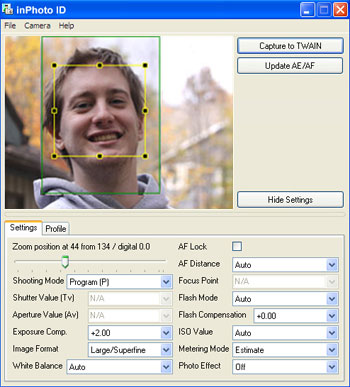
The inPhoto ID software is designed for automatic ID photography. inPhoto ID software is developed on the basis of inPhoto Capture software (Canon camera control), includes all its abilities, and some important new features for automatic face recognition / crop, and image ehnacement.

 
To get an idea on why it makes sense to try the inPhoto ID software please refer to inPhoto ID distinctive features.
 
inPhoto ID software can work as TWAIN driver with all TWAIN compatible ID card applications (Asure ID, ID Works, EPISuite, CardFive, ID Flow and others). Just connect your Canon camera to computer, install inPhoto ID software, and enjoy working with your Canon digital camera from within any standard ID card software supporting image acquisition via TWAIN. Please refer to How to start for more details. 


ID photography software
Basic features of inPhoto ID (ID photo sftware):

Ability to work as TWAIN driver;
Camera settings control from computer:
Focus (Optical Zoom, Digital Zoom)
Exposure (Aperture, Shutter, Exposure Compensation)
Mode (Sensitivity, White Balance Mode, Flash Mode)
Image (Compression, Resolution);
Live image preview:
dynamic mode at 15 fps with 320x240 pixels resolution
Image rotation: automatic (depending on the camera orientation) and manual by 90 and 180 degrees;
Face detection on a live image in preview window.
Image capture
Face crop on the captured image.
The cropped image enhancement.
Image export to the applications supporting TWAIN protocol.
Save and load user profiles.


  inPhoto ID camera control software supports the following Canon cameras:

Pro series - Pro90 IS, Pro1
G-series - G1, G2, G3, G5, G6, G7, G9, G10
S-series - S10, S 20, S30, S40, S45, S50, S60, S70, S80, S1 IS, S2 IS, S3 IS, S5 IS, SX100 IS, SX110 IS
A-series - A10, A20, A30, A40, A60, A70, A75, A80, A85, A95, A100, A200, A300, A310, A400, A510, A520, A620, A640
Digital IXUS - SD100 (Digital IXUS II), SD110 (Digital IXUS IIs), S230 (Digital IXUS 330), S400 (Digital IXUS 400), S410 (Digital IXUS 430), S500 (Digital IXUS 500)


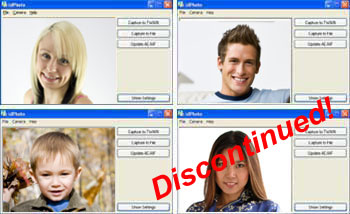
Attention! The previous version of inPhoto ID (version 1.9 discontinued in 2008) supports also some old Olympus cameras. See a list of Olympus cameras supported.

inPhoto ID software is designed by Mars Systems company.

inPhoto ID software To order please visit Purchase... or contact info@akond.net.

Other software products for camera control and more:

Incardex software: ID card design and printing.
inPhoto Capture software: Canon camera control.
inPhoto Capture SLR software: Canon SLR (reflex) camera control.
inPhoto ID WDM software: web cameras and all WDM compatible cameras control, automatic face detection on live image, face crop and image enhancement.
ID Photo Processor software: batch photo processing.


Attention! The operation and functionality of camera settings control, image preview, rotation, image export, and user profiles are the same for inPhoto ID and inPhoto Capture software.

See Comparative table...


  See also:


Home|News|Products|Download|Buy|Applications|Support|Company|Links|Site map|Contact
 

Contact: +7-812-6006918
Tel/Fax: +7-812-6006918
Tel: +7-921-7578319
email: info@akond.net
Copyright © 2006 - 2010, Akond
Web site designed and developed by Memento Graphics