Windows 2000, XP, Vista, Windows 7 (32 and 64 bit), Windows 8
 Buy Buy  Download Download
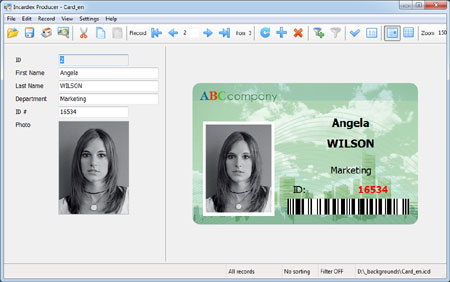
Incardex - ID card software - is designed for ID card design and printing (create ID card layouts, create database, enter the personal and other information, insert photos, preview and print ready ID cards).
Incardex features
Create and manage internal database:
Easily create internal database
Add as many fields as required to the database. Add text, data, numeric, and photo fields.
Easily manage fields in the database: delete, move, rename options.
To create and manage internal database use Incardex Designer module of Incardex software.
More details... on internal database management.
Connect with the external database:
Connect to any open database (MS Access, MS SQL Server, Oracle, MySQL and other).
Easily manage fields in the database: add, delete, move, rename options.
To connect with the external database use Incardex Designer module of Incardex software.
More details... on external database connection.
Create ID card layouts:
Create one-sided or two-sided cards and badges of any standard or user-defined size. Select portrait or landscape orientation for your card or badge.
Add ID card background.
Add graphic, text, images, and barcodes onto cards and badges.
Add ID photos. Edit ID photos.
Encode magnetic stripe.
Create multiple card layouts connected with the same database.
To create ID card layouts use Incardex Designer module of Incardex software.
More details... on ID card design features.
Add records:
Open available ID card layout and add new records
Enter cardholder information in a new record
Capture cardholder photo with Canon Powershot camera controlled from computer with inPhoto ID PS or with web camera (e.g. Logitech or Microsoft). Capture ID photos with Canon SLR cameras controlled from computer with inPhoto ID SLR software. Load ID images to the database from disk. Edit cardholder photo if necessary
Save photo file directly in the database record or save only a link to the photo file stored on disk.
To add records use Incardex Producer module of Incardex software.
More details... on adding records.
Print cards and badges:
Preview and print cards and badges.
Select and mark database records for printing.
Filter database records for review and printing.
Multiple card printing. Ability to print desired number of cards on a sheet.
To print cards use Incardex Producer module of Incardex software.
More details... on card printing. |